
Learn from YCBM Experts: Explore 19 Real-World Booking Page Examples
-min.png?width=100&name=image%20(21)-min.png)
Create your free booking page

So, you’re ready to build a booking page but aren't sure where to start?
From defining appointment types and crafting compelling descriptions to fine-tuning booking form questions and policies, creating the perfect booking page may take some time.
And while the right info is essential, remember—your booking page is also part of your brand. It’s more than just functional. With consistent branding, you’re not only making it look polished, you’re reinforcing your identity, building trust, and giving clients a seamless experience from start to finish.
To give you fresh ideas and inspiration, we’ve gathered a few live examples from happy YouCanBookMe customers.
Dive into these 19 booking pages, spanning diverse industries and services, see them in action, and ignite the creative spark you’ve been searching for. ✨
Let's get into it!
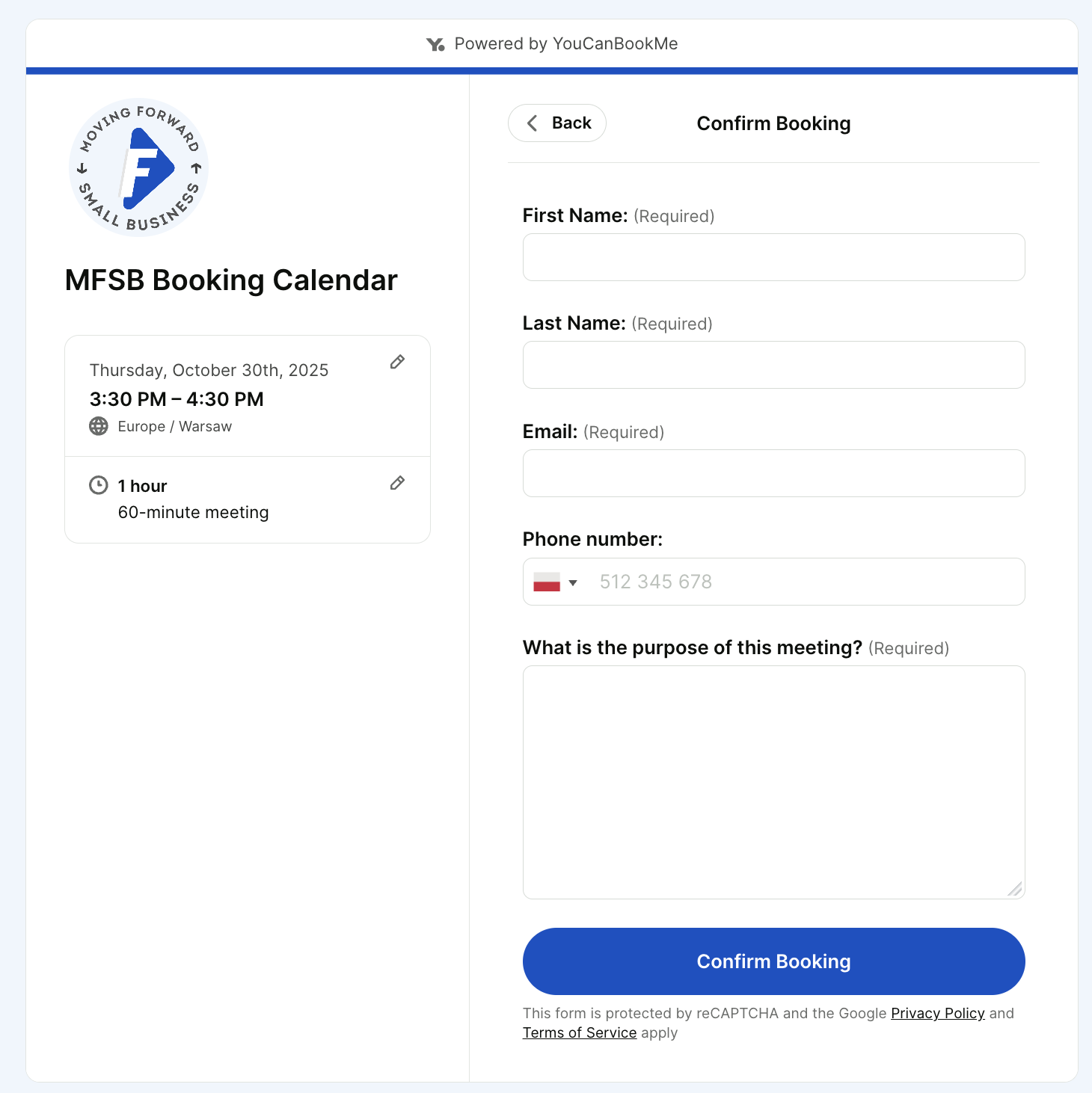
Meet Jimmy Newson, the Founder/CEO of Moving Forward Small Business, a community-based membership company providing resources to business owners, entrepreneurs, and start-ups.
👉 About Jimmy’s booking page: Jimmy offers two different general meeting options, one for a 30-minute chat and one for a 60-minute chat. He also includes his photo and a link to his business right on the booking page.
👀 What caught our eye: To book with Jimmy, the booker has to provide a purpose for the meeting. This allows Jimmy to fully prepare for each chat to give the booker as much value as possible.
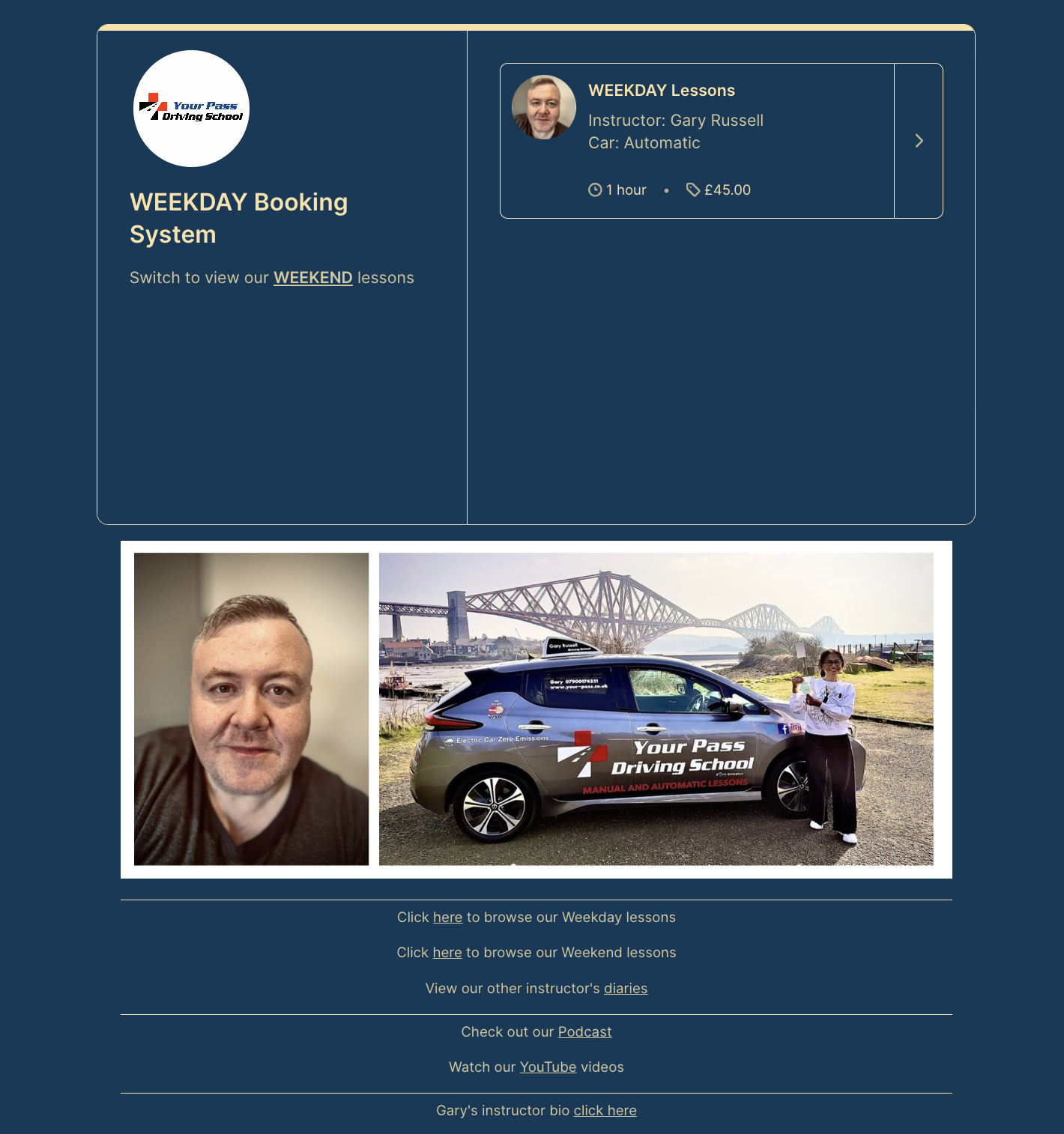
Say hello to Gary Russell, founder of Your Pass Driving School based in Fife, Scotland. Since becoming a driving instructor in 2012, Gary has grown Your Pass into a thriving, multi-instructor business dedicated to helping students build lifelong confidence behind the wheel.
👉 About Gary’s booking page: Gary uses the duotone theme in our driving school scheduling software to run two booking pages—one for weekday lessons and one for weekends. The appointment types on each page have their own price and duration, and students must agree to his 48-hour cancellation policy before booking.
👀 What caught our eye: Gary makes the most of his custom booking page footer, adding photos, links to his and other instructors’ booking pages, and resources like his podcast and YouTube channel—keeping students engaged beyond their lessons.
|
💡 Pro tip: Create a branded footer like Gary’s with our free booking page templates, including pre-sized Canva designs for footers, profile photos, backgrounds, and appointment thumbnails. |
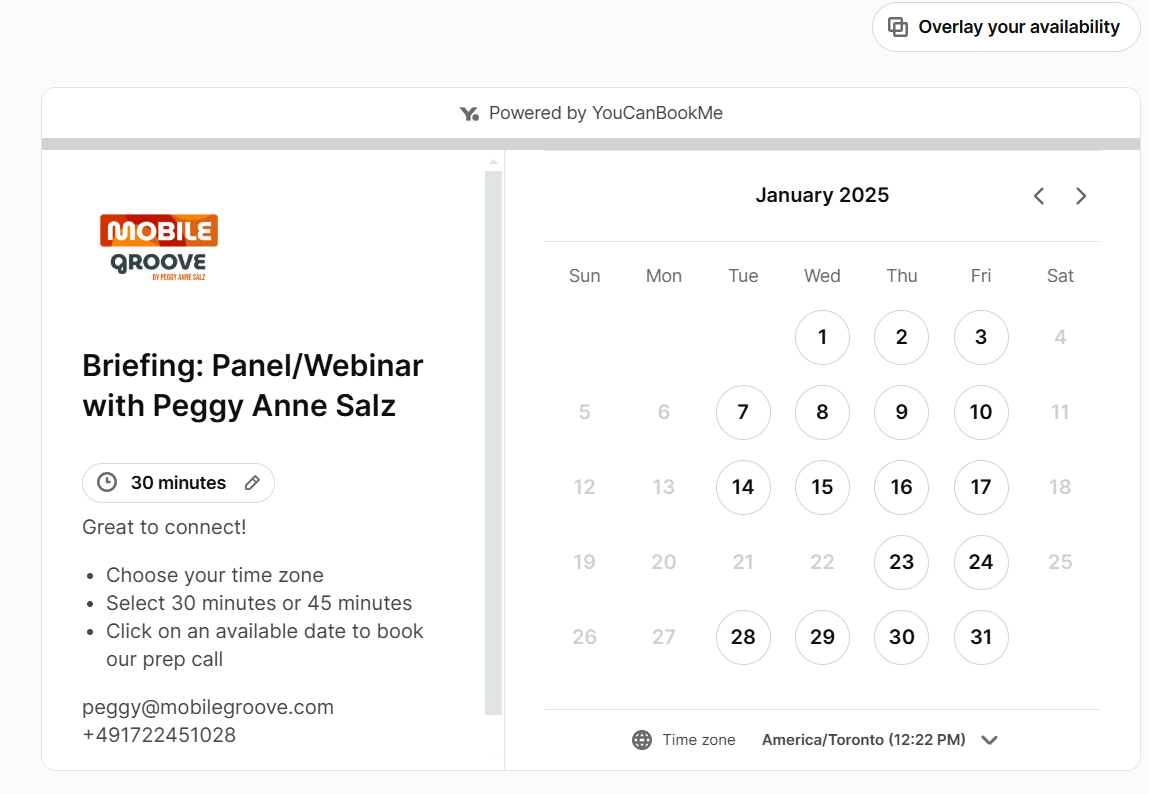
Give a warm welcome to Peggy Anne Salz—journalist, content strategist, podcast host, and all around mobile-marketing powerhouse. As founder of MobileGroove, Peggy helps marketers and tech startups navigate the fast-changing mobile landscape with research, strategy, and fresh insights.
👉 About Peggy’s booking page: Peggy’s page gives bookers the choice between a 15- or 30-minute appointment. After choosing their preferred duration, date, and time, they’re taken to a booking form to provide key details such as name, company, job title, and any additional attendees.
👀 What caught our eye: Peggy ensures a smooth experience by adding clear booking instructions to her page and sharing her contact details so bookers can easily reach out with any questions.
YouCanBookMe makes it all possible. It gives you, in a way, superpowers. As an individual, when I have this, it's like, 'Yeah, I've got this.' I’m at command central—I can run everything.”
- Peggy Anne Salz
Your bookers deserve better.
Build a scheduling experience for clients that looks and feels like you!

Introducing Joe Darling—a professional production potter, passionate teacher, and founder of The Pottery Shed, a thriving pottery studio and art school in Sydney, Australia. When he isn’t handcrafting custom-designed homeware, he is sharing his gifts with over 76,000 students, and counting!
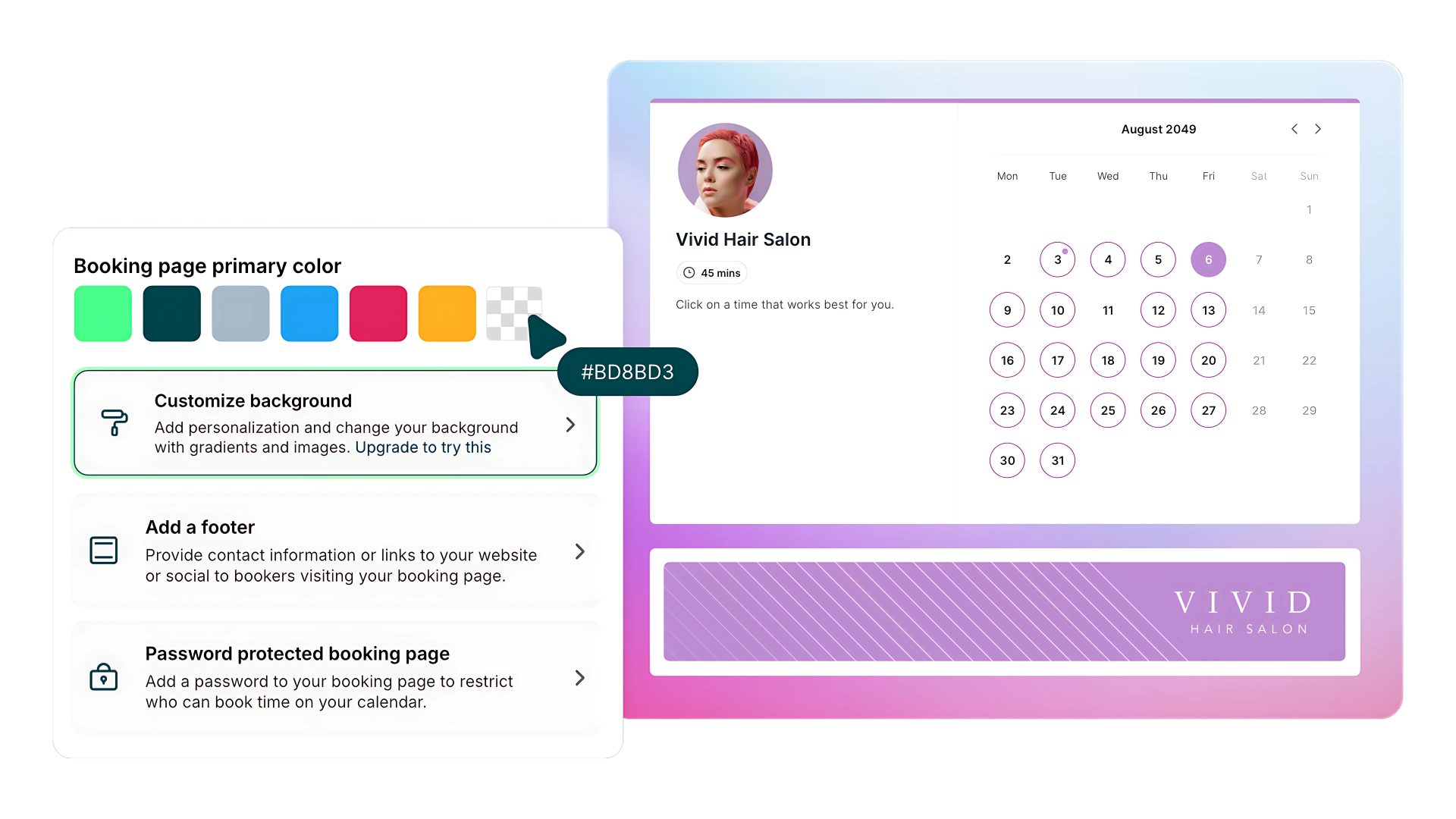
👉 About Joe’s booking page: Joe manages 12 live booking pages to cover everything from intro classes to private sessions. Some pages offer group booking with automatic capacity management, while others let students redeem vouchers for pre-paid class packages. He also makes great use of the custom background feature, adding a photo of his studio to give the page a personal touch.
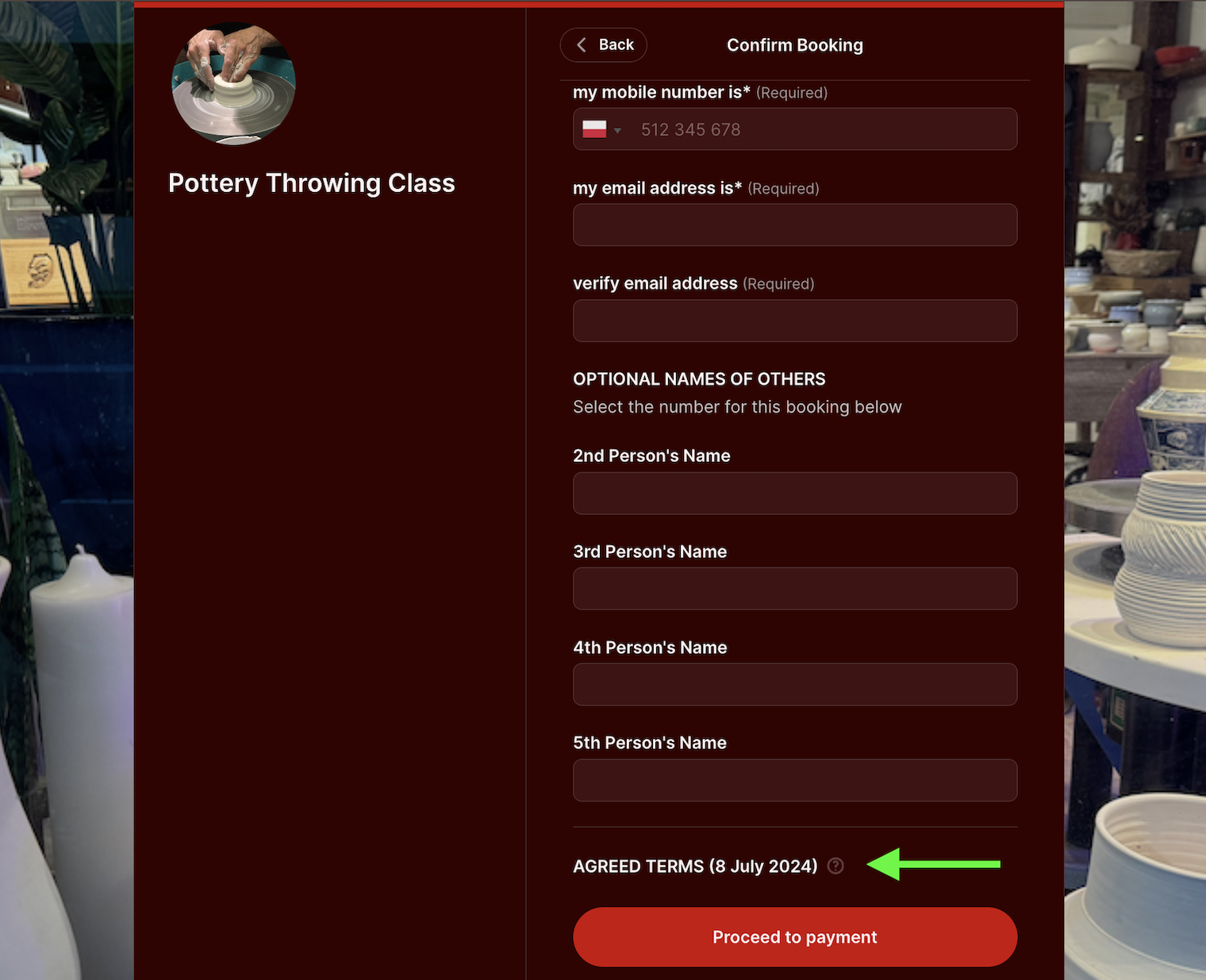
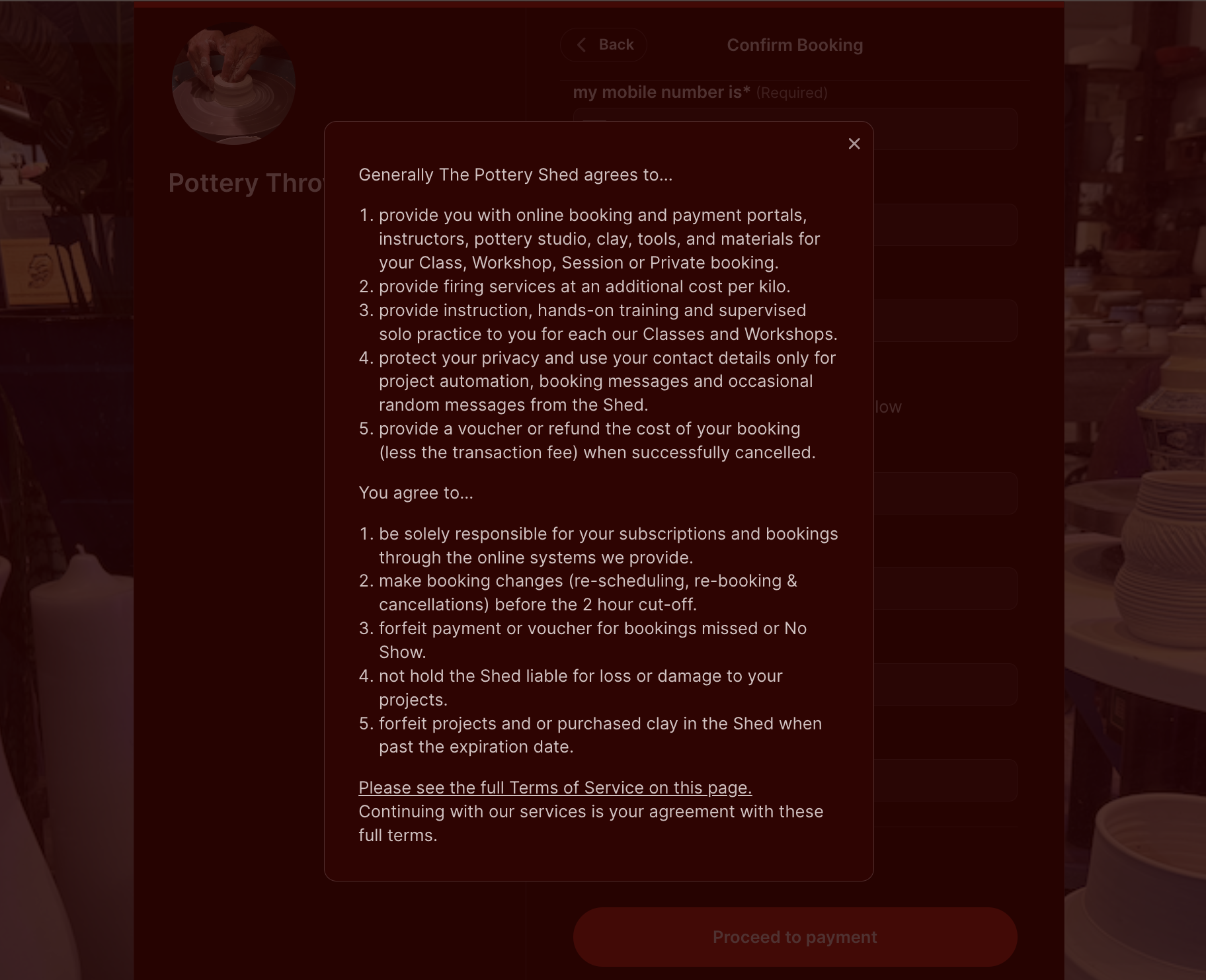
👀 What caught our eye: Joe’s sign-up form features a pop-up with The Pottery Shed’s booking terms. By clicking the “?” icon, bookers can review the terms and conditions—setting clear expectations all while helping Joe protect his time and business.
|
🎉 Fun fact: Joe’s studio has already booked over 90,000+ pottery sessions through our art class registration software! |
You guys are brilliant. The system is so granular—it gave me exactly what I needed, and that’s why I’ve stuck with it all these years.”- Joe Darling
|
✍️ Need help creating policies that actually work? Explore tangible examples of 17 different small business policies to inspire your own. |
It’s time to meet Gareth Marlow, an executive coach who launched his company, eqsystems.io, to help tech leaders build solid teams, products, and organizations.
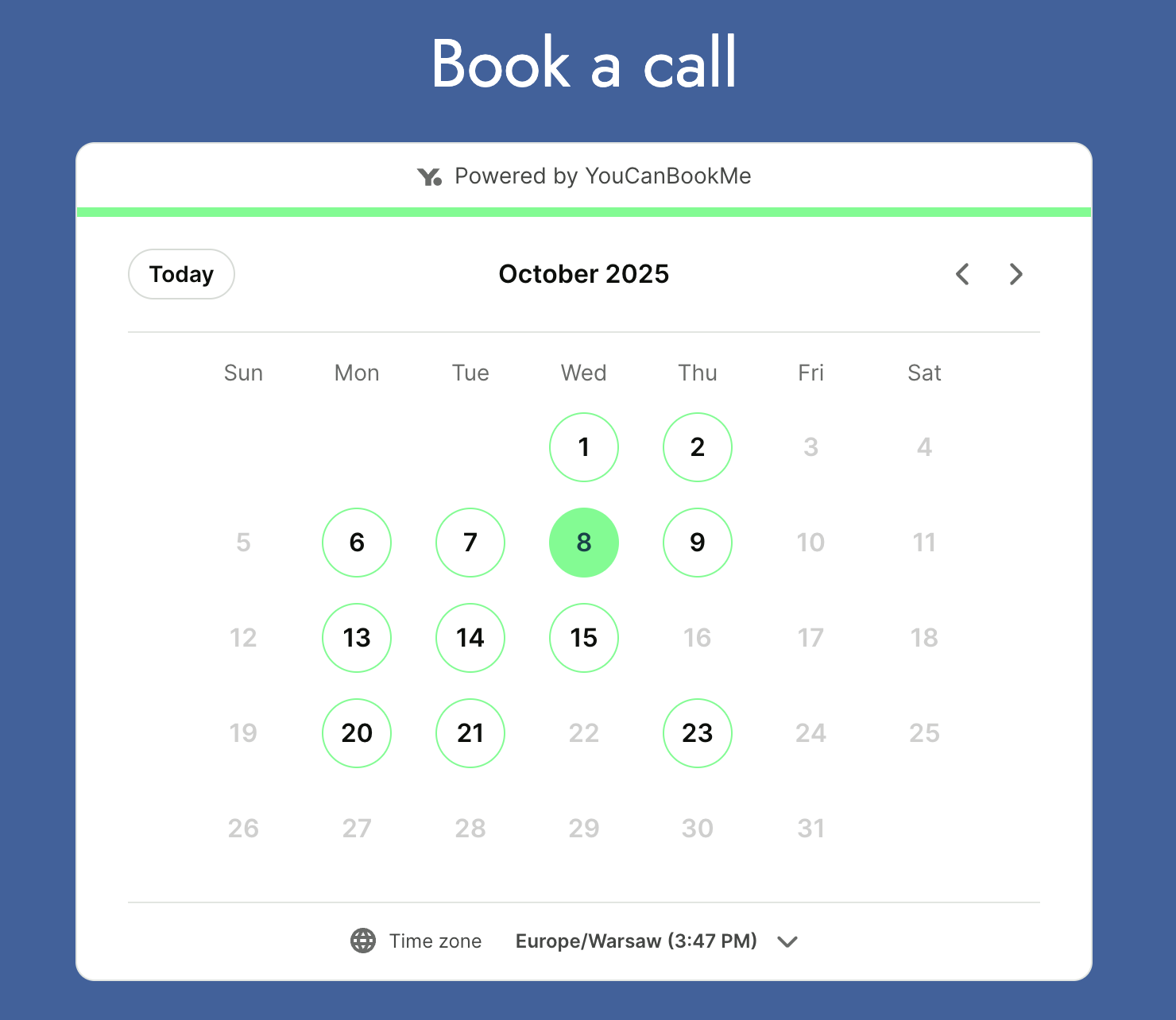
�� About Gareth’s booking page: Gareth has separate booking pages for his various services, allowing him to send tailored booking links to his clients. The one linked above lets clients quickly book 1:1 coaching calls with Gareth.
👀 What caught our eye: Gareth has embedded his booking page directly onto his website, letting visitors easily book a meeting without needing to leave his site. This is a great way to reduce friction for customers when it comes to booking time with you.
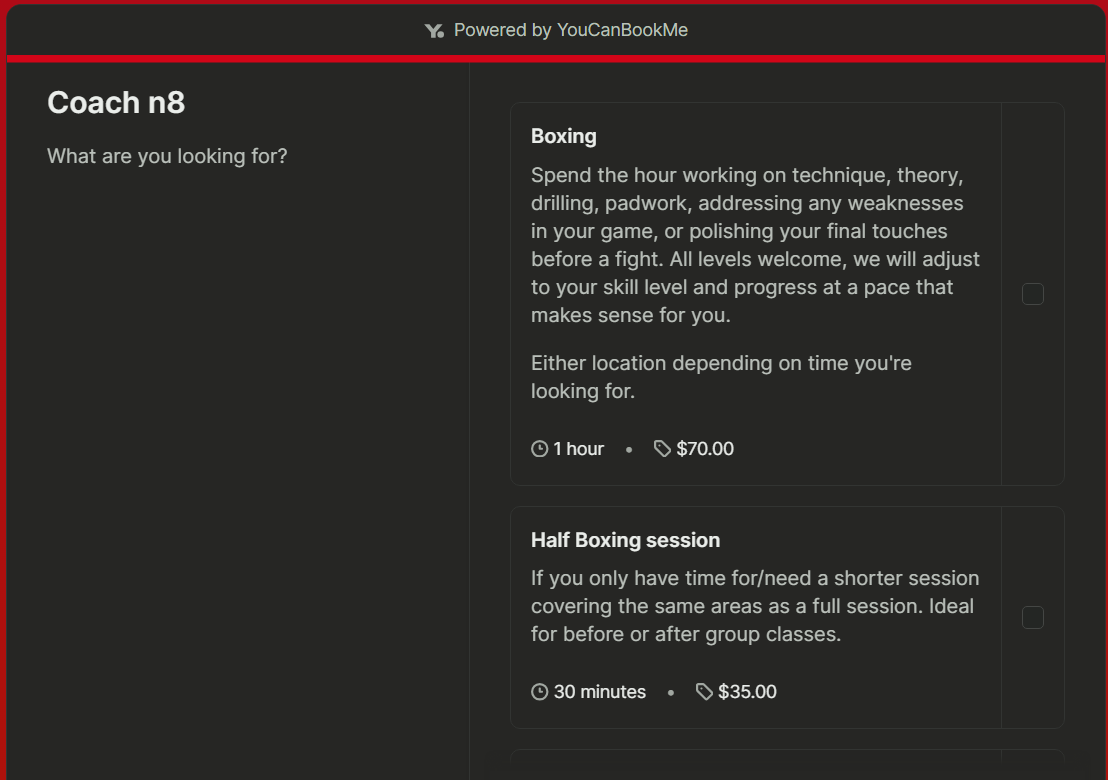
Introducing Nate Cruz, a firefighter and boxing-champion-turned-coach. With over a decade in the ring, he’s dedicated to teaching everyone—from champions and MMA pros to total beginners—the craft and discipline of boxing.
👉 About Nate’s booking page: Nate’s booking page makes scheduling easy, with options for group classes, one-on-one sessions, and package deals. Bookers can reserve multiple appointments at once, while Nate’s calendar automatically shows only the times that fit—saving everyone time and hassle.
👀 What caught our eye: Nate has integrated Stripe, which lets him book sessions and collect payments all in one go. When a booker selects two or more appointments, the prices are automatically added together. A booking cannot be confirmed unless a payment is made, which ensures Nate protects his bottom line.
Say hello to Carolina Traviglia, a dental hygienist who offers various dental hygiene services to her patients in Granges-Paccot, Switzerland.
👉 About Carolina’s booking page: Carolina offers six different appointments in varying lengths. When needed, she includes a description of the tools she uses. Carolina has also included her office’s address and a link to her pricing structure on the booking page.
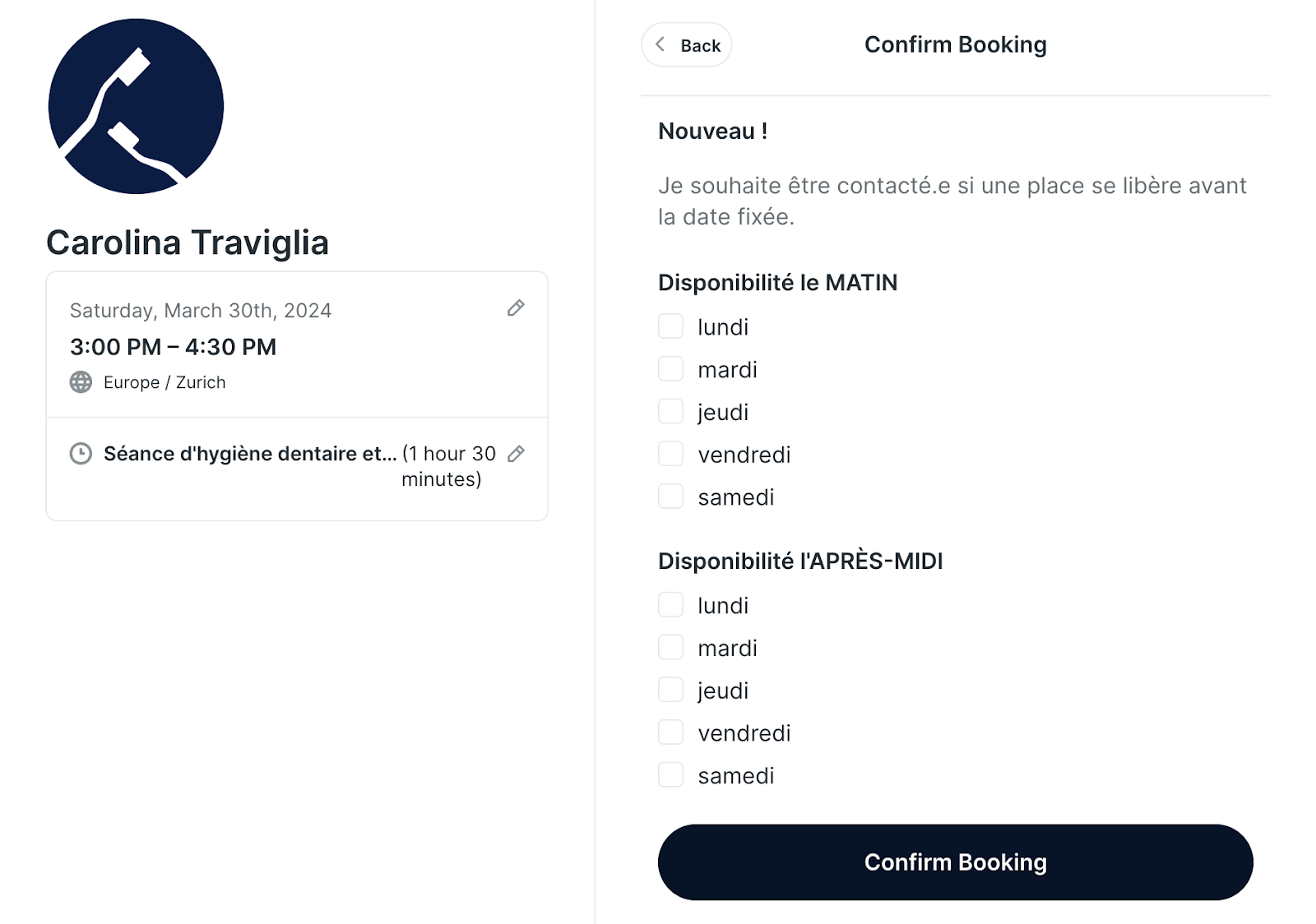
👀 What caught our eye: Carolina has added a few useful questions on her booking form—she asks if the patient has used her services before, their date of birth, and if they have any requests. Below, you’ll see that Carolina is also testing something new: asking the patient if they would like to be contacted if an appointment becomes available sooner.
Carolina has added two sections for this: one to select which days patients are typically free in the mornings and one to choose which days patients are typically free in the afternoons. With this handy addition, Carolina is able to ensure her calendar is always full, even in situations when someone cancels or reschedules at the last minute.
|
🗺️ Fun fact: Did you know you can set your YCBM booking page to any of 44 languages, including right-to-left scripts? |
Jérémy Boyé is a Paris-based wellness consultant dedicated to helping his clients improve their quality of life and develop vitality. He specializes in ayurvedic massages and consultations, as well as laughter yoga.
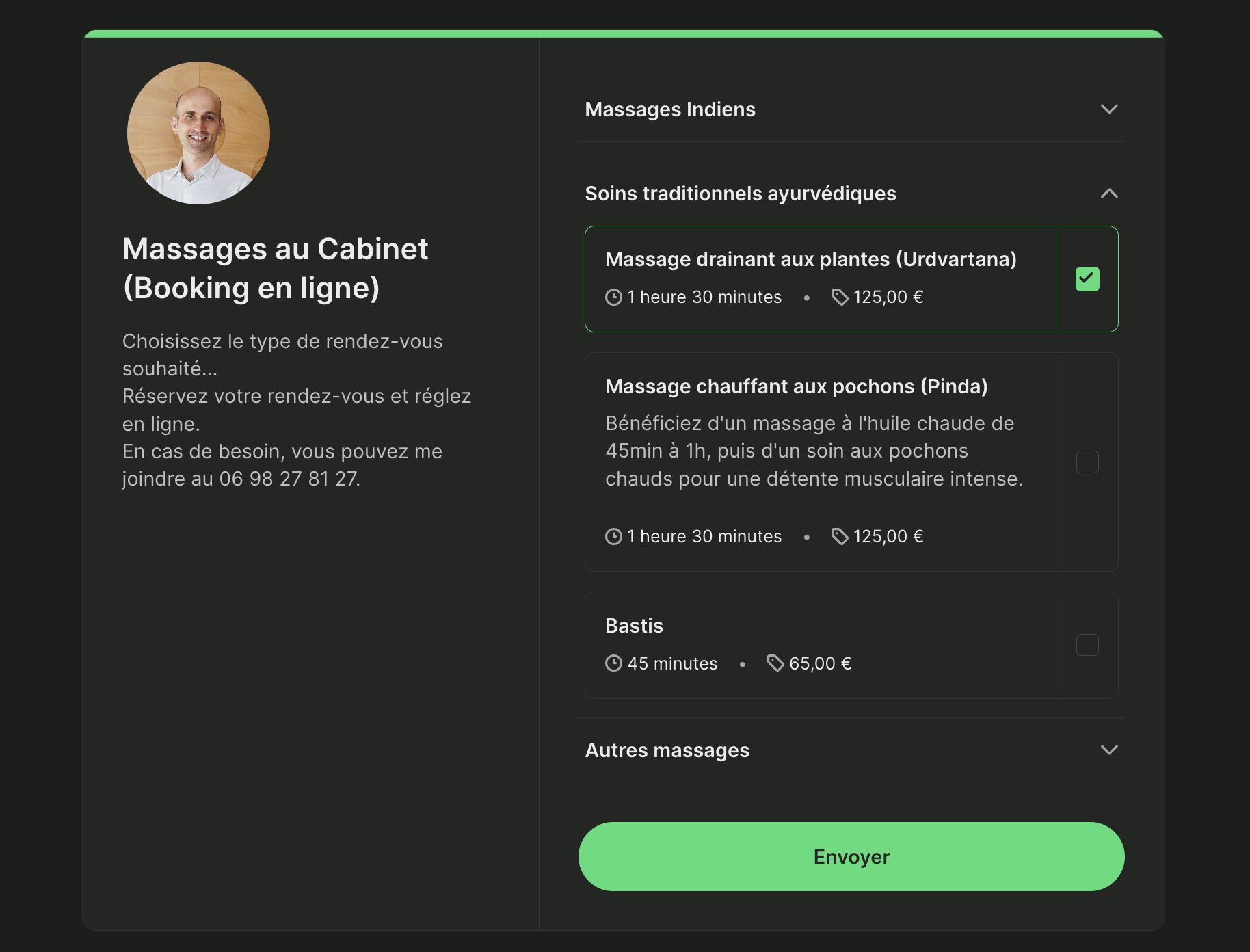
👉 About Jérémy’s booking page: Jérémy offers a whopping 28 different services via our massage scheduling software, all listed with their price tags, lengths, and sometimes a slightly longer description. Jérémy includes a contact number and links to his site, as well as his colleague’s pages, right on his own booking page.
👀 What caught our eye: Jérémy's page includes seven different categories for appointments, making it easier for his clients to quickly find and book the exact service they’re looking for.
|
Need ideas for your own page? Our health and wellness booking page examples highlight practical ways to showcase services, manage appointments, and make booking simple. |
Say hello to Daniele Lugli, a Brazilian tattoo artist currently based in Melbourne, Australia. Daniele specializes in botanical art and nature-themed tattoos.
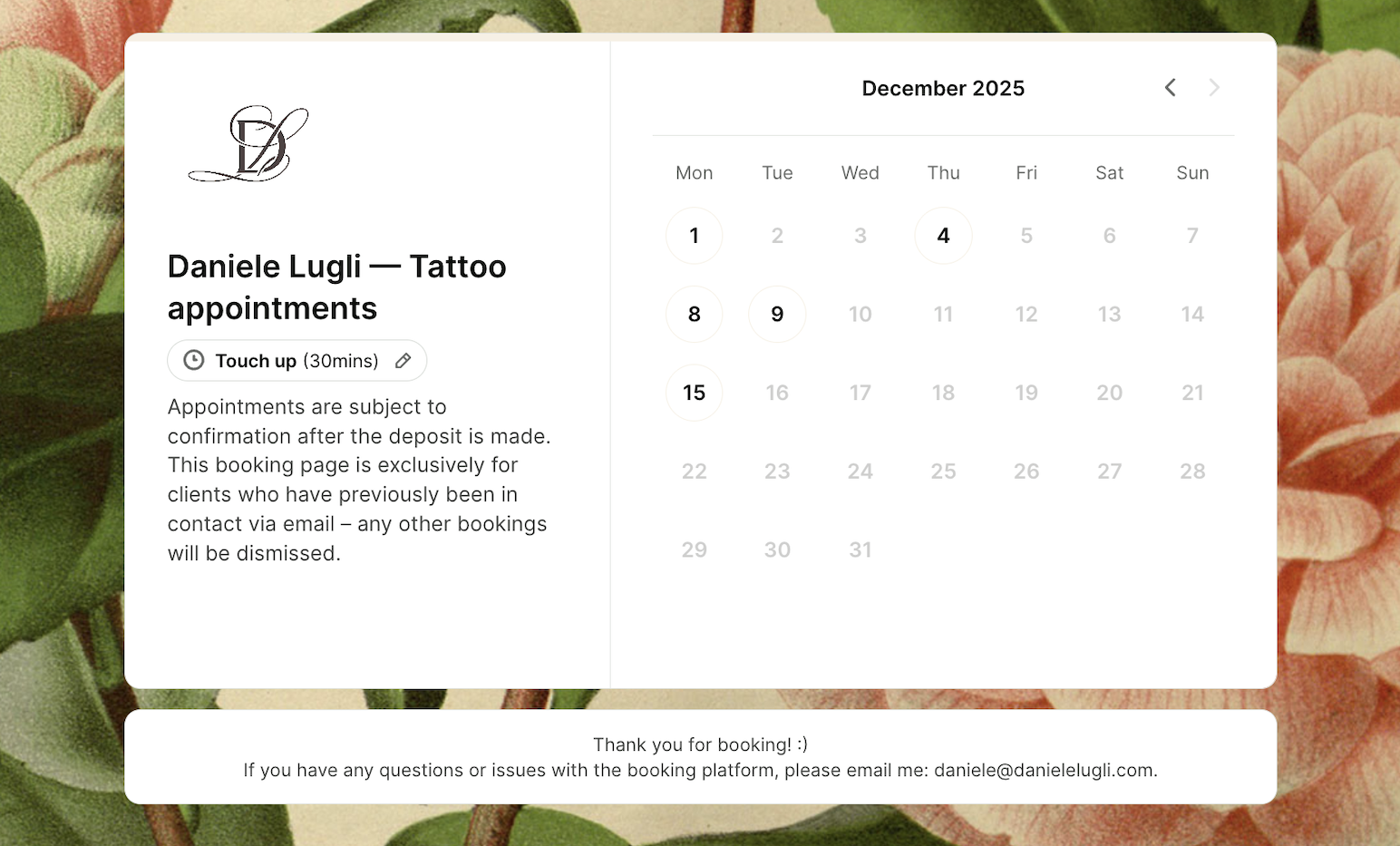
👉 About Daniele’s booking page: Daniele offers three types of appointments on her page: consultation, touch-up, and tattoo. Her tattoo appointments range from one hour to a full day. As she is a tattoo artist, Daniele requires her clients to confirm that they are over 18 years old before booking.
👀 What caught our eye: Daniele includes her appointment terms on her booking page, ensuring visitors know that both a conversation with Daniele and a deposit are required before appointments are confirmed. This helps prevent misunderstandings as well as safeguard Daniele’s time.
Before YouCanBookMe, I had at least 20 emails back and forth trying to find a time to book that tattoo between me and the client.”
- Daniele Lugli
|
📝 Having trouble setting rules for your own appointments? These booking policy templates will help. |
Sage Benefit Advisors helps clients navigate the complicated world of health insurance to choose the best, most affordable plans available. Sage advisors handle tax credits, compare plans, and simplify enrollment so their clients can be happy, healthy, and insured.
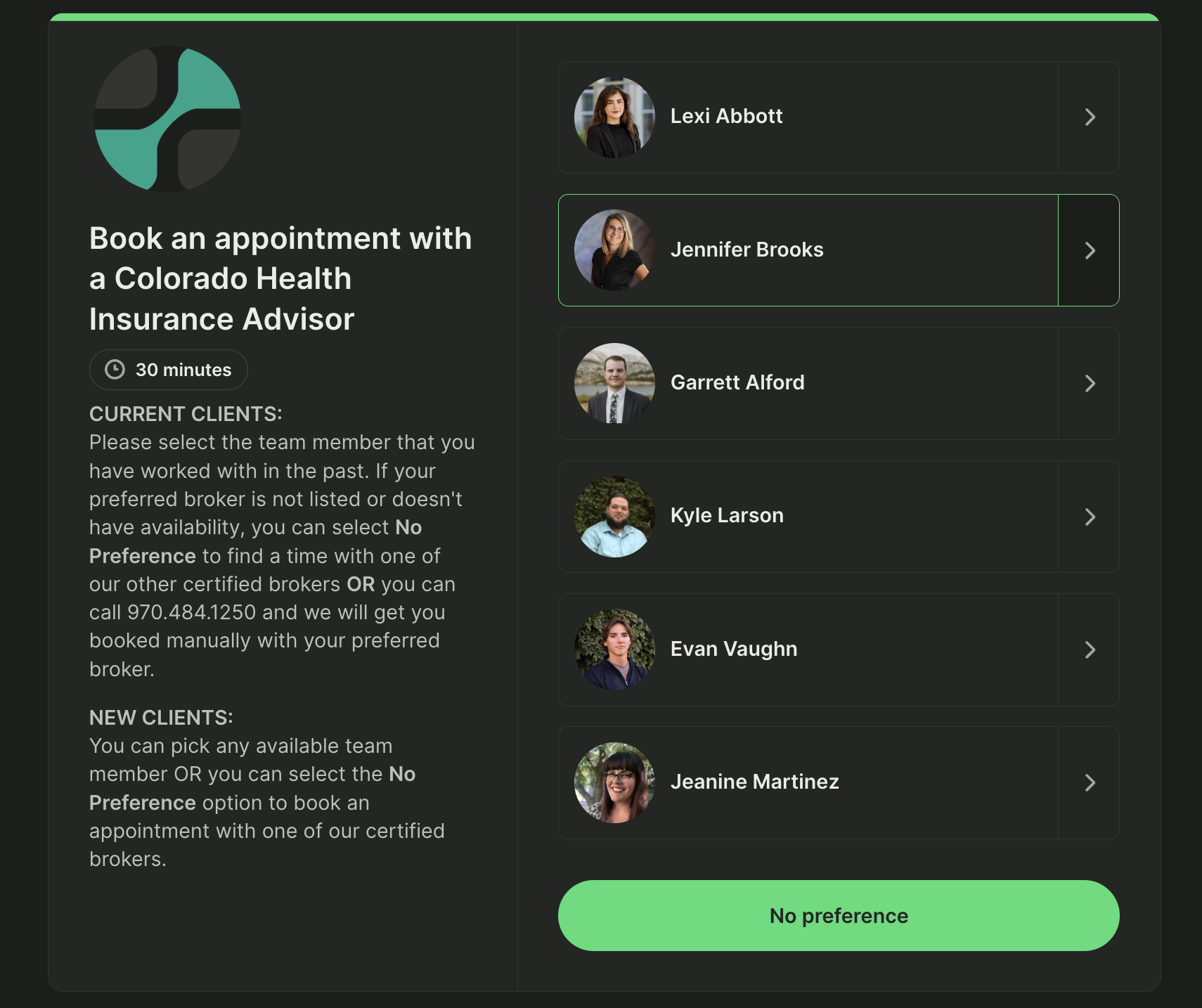
👉 About Sage Benefit Advisors’ booking page: Sage offers 30-minute insurance advising appointments with six different team members. They provide clear instructions for both current and new clients, and contact info in case of any further questions.
👀 What caught our eye: Rather than being organized by different appointments, Sage Benefit Advisors’ booking page is sorted by team members. Yep, one booking page lets Sage schedule their entire advising team! Clients can choose to meet with a specific insurance advisor or select “no preference” to grab the quickest available slot.
|
Work in insurance or accounting? Our financial services booking page examples shows six real-world setups from advisors, planners, and lenders. |
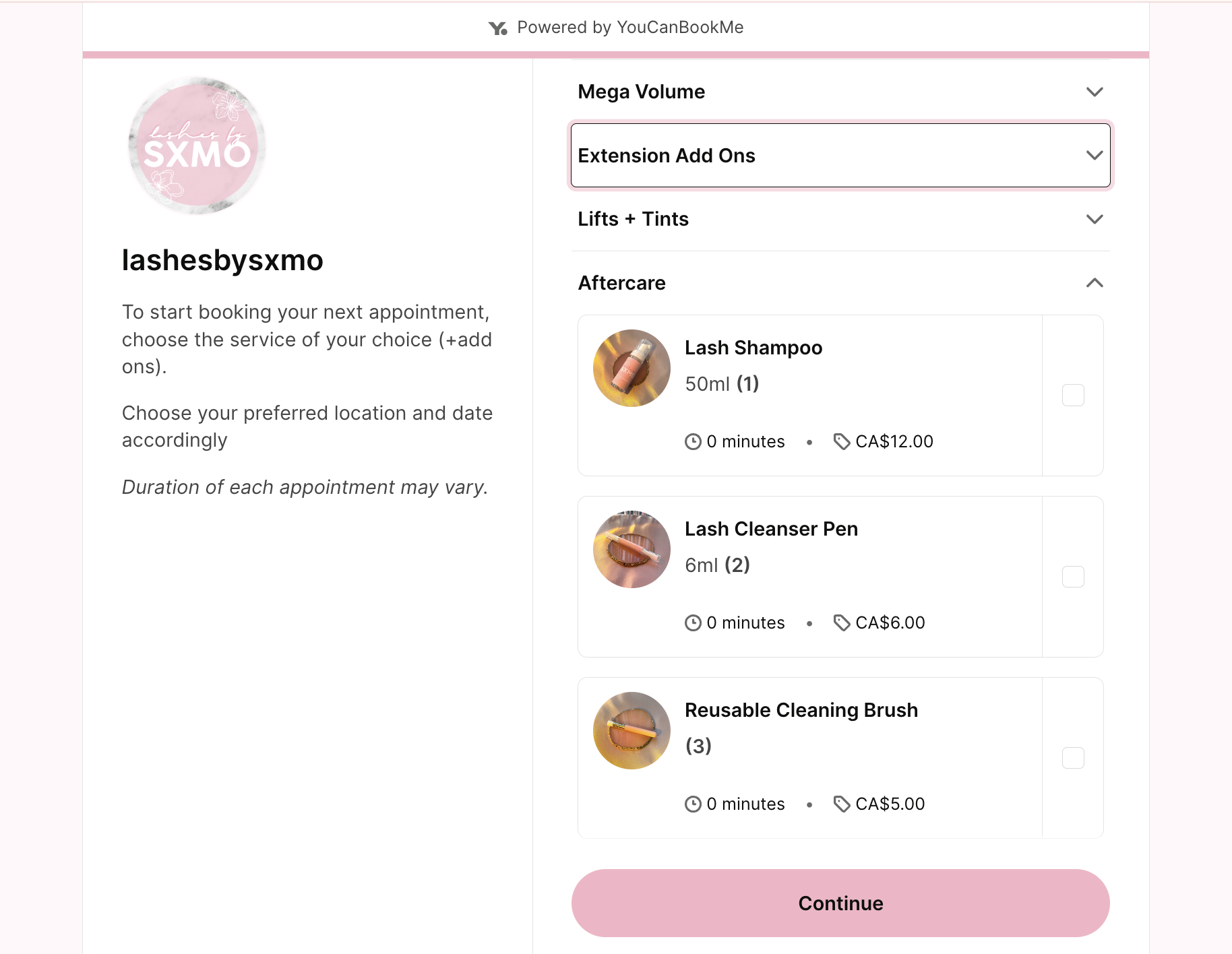
👉 About Sandra’s booking page: Sandra’s booking page is chock full of different lash services, all neatly organized by categories. The price and duration of each is clearly listed, and once selected, customers can choose between two different locations for their services.
👀 What caught our eye: Sandra boosts both her business and her clients’ experience with paid add-ons, offering custom lash styles, removals, and lash baths, along with aftercare products like shampoos and care kits to keep lashes looking their best.
I went through every single link on the first page, and I just fell in love with the user interface. Ever since then, I’ve been learning how to use all its features. Every time I tried something new, I got such great positive feedback from my clients.”
- Sandra Mo
See how to turn your bookings into revenue:
Say hello to Danielle Cote, store manager at Chris Cote’s Golf Shop—a family-run business that’s become Connecticut’s go-to spot for everything golf. For the past six years, she’s been working side by side with her family to grow the shop, helping golfers of all levels with fittings, lessons, simulators, repairs, and more.
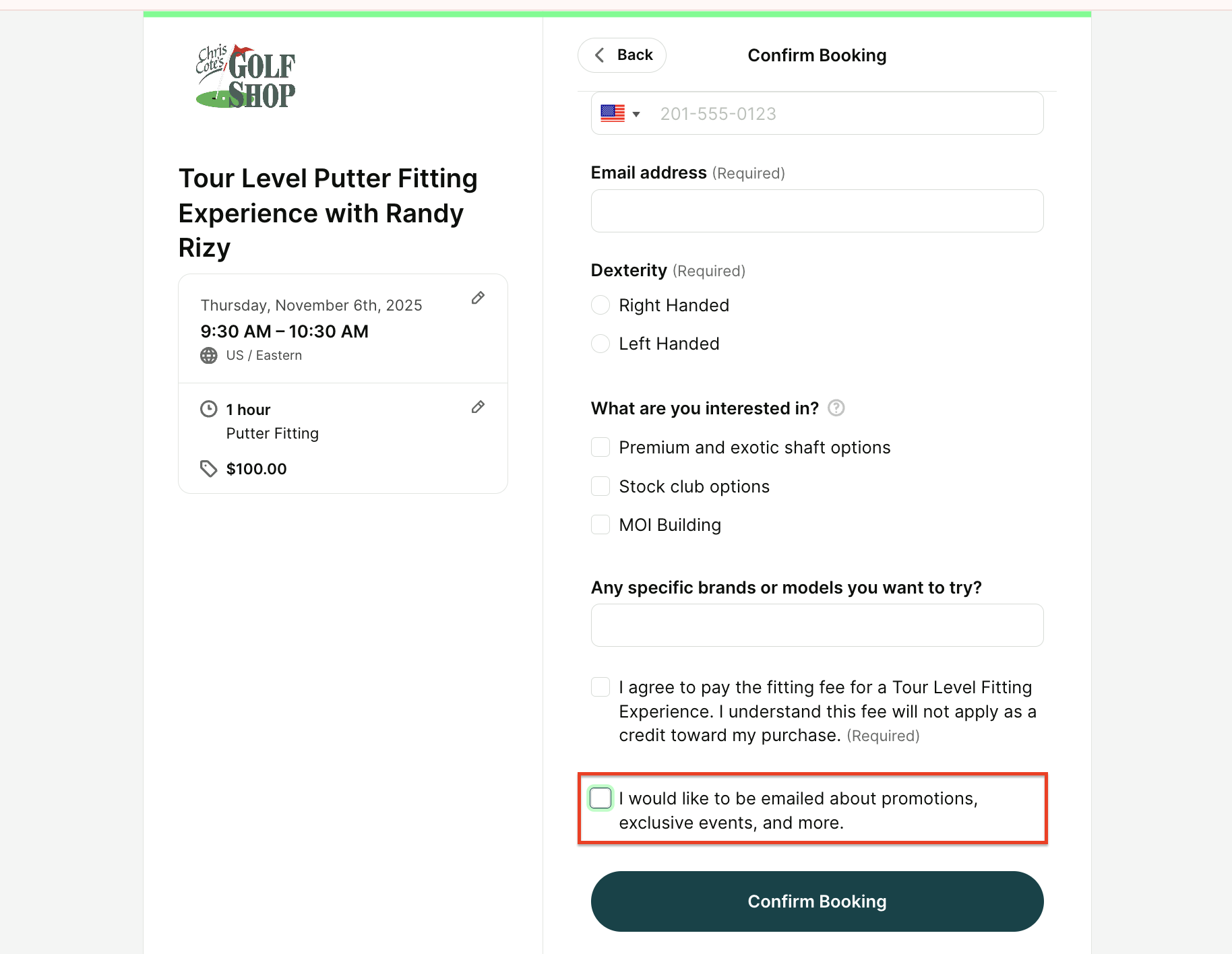
👉 About Danielle’s booking page: Chris Cote’s Golf Shop uses our scheduling software for retail to manage 16 different booking pages. The one we’re highlighting here is for 1-hour, in-person putter fittings. Danielle set up a detailed booking form to ask all the right questions—like dexterity, favorite brands, and what customers are looking to buy—so every fitting feels personal and spot on.
👀 What caught our eye: At the bottom of her booking page, Danielle added a simple checkbox for clients to opt into email marketing—making it easy to stay connected long after their visit to the shop.
|
📩 Want to collect marketing consent in YouCanBookMe? Check out our guide on how to set up email automation in YCBM, complete with ready-to-use marketing email templates. |
YouCanBookMe really helped streamline our bookings. And now we use it for everything.”
- Danielle Cote
Introducing Hannes Merisaari, Chief Customer Officer at Lyyti. For more than 17 years, Lyyti has been helping event professionals simplify registrations and create events that matter across Europe and beyond. At the center of it all is a clear mission: helping people create meaningful encounters.
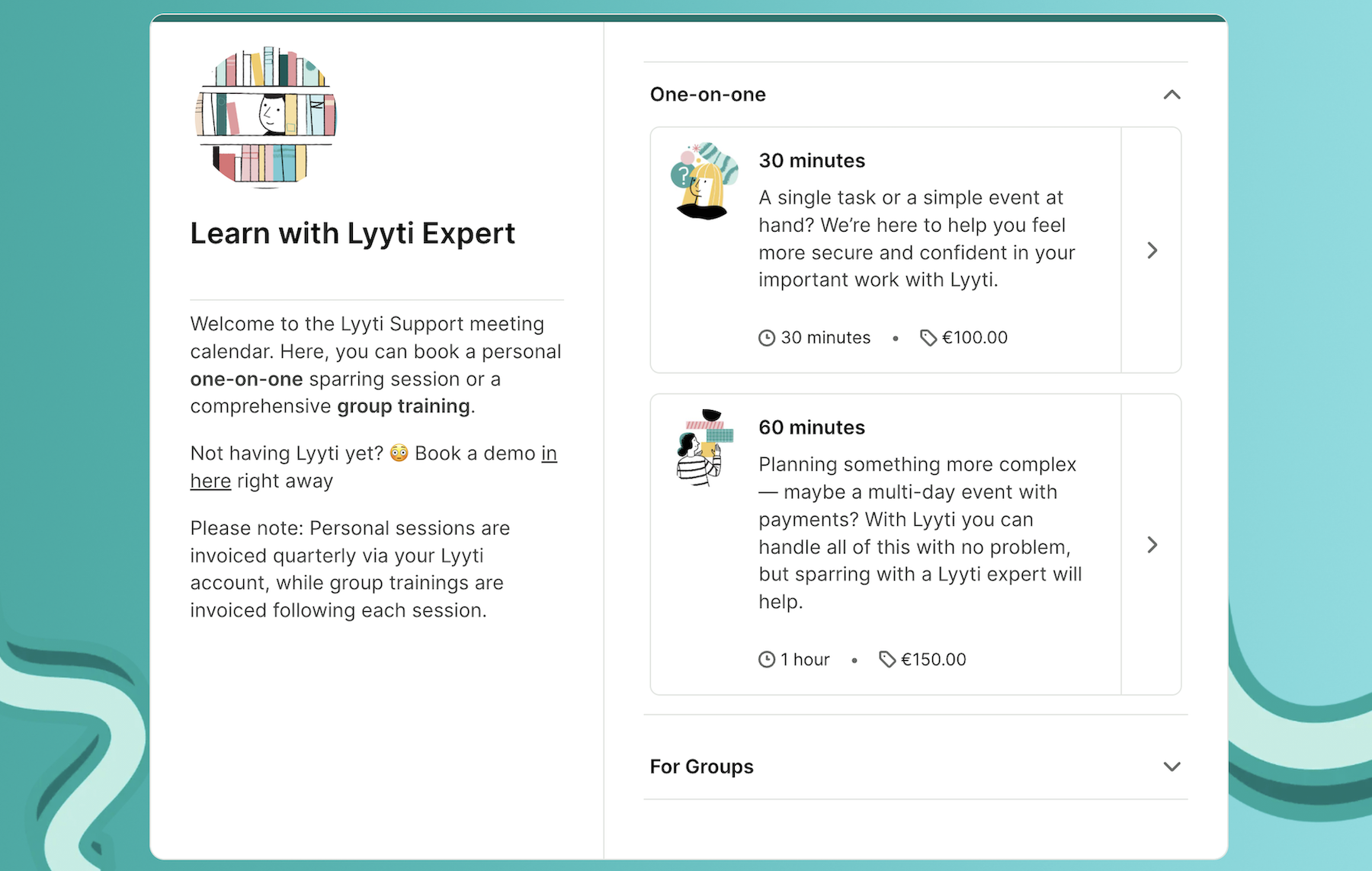
👉 About Hannes’ booking page: Lytti’s support calendar makes it easy for bookers to find the right appointment, offering both group sessions and one-on-one meetings. Each appointment type comes with its own duration and price. Bookers can choose a specific support specialist or select “no preference,” then use the booking form to share details about what they need help with.
👀 What caught our eye: Lytti’s branding really shines through on their booking page. With a custom background, branded colors, and playful icons, it feels like a natural extension of their website. Add in the clear, conversational meeting descriptions and friendly instructions, and the whole page strikes the perfect balance of professional and welcoming.
I really haven’t met a real competitor for YouCanBookMe.”
- Hannes Merisaari
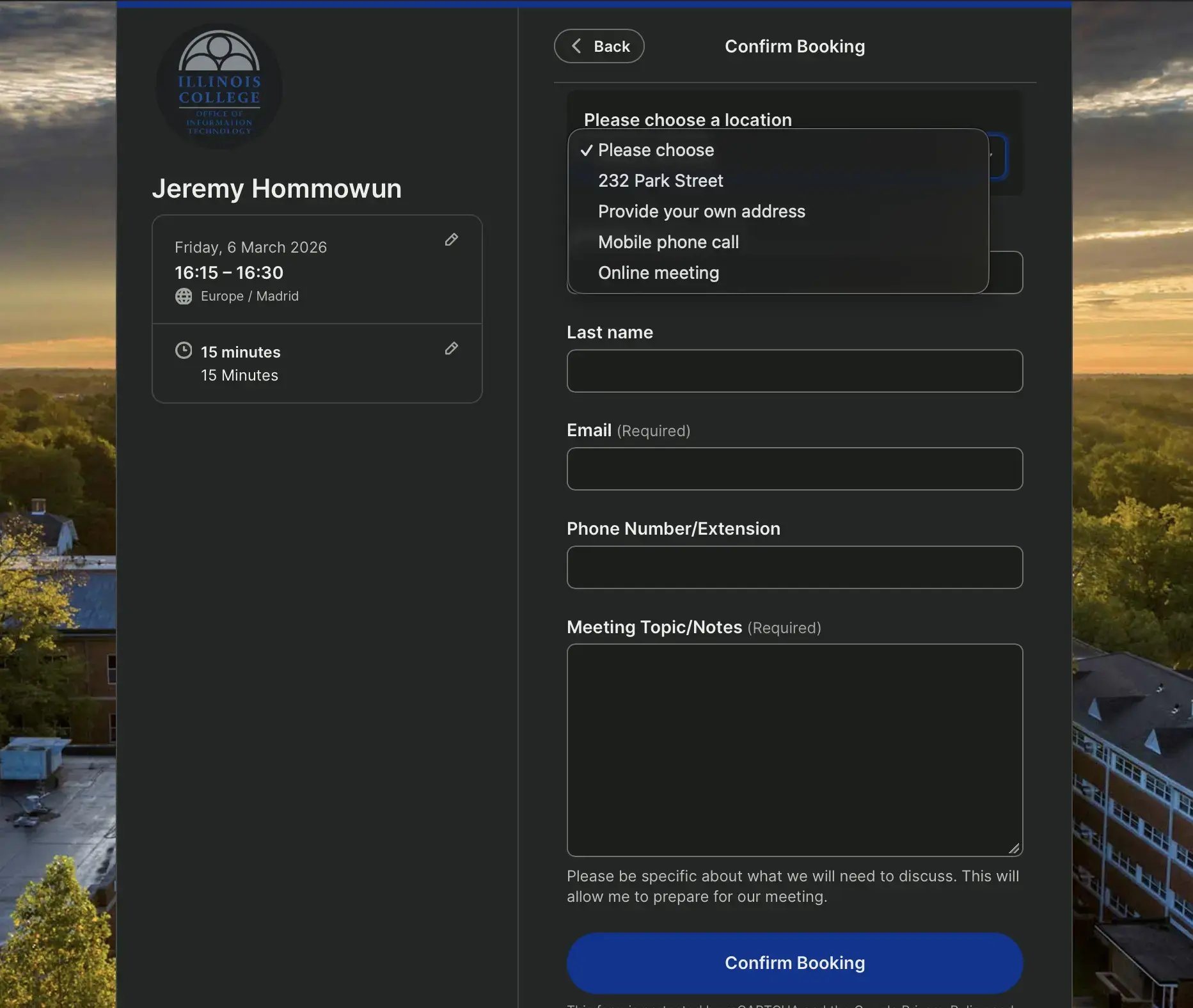
Meet Jeremy Hommowun, Educational Technology Manager at Illinois College. With more than 17 years supporting faculty, staff, and students, Jeremy helps keep the campus running smoothly—from classroom tech troubleshooting to one-on-one support sessions.
👉 About Jeremy’s booking page: Jeremy offers a range of meeting lengths, from quick 15-minute chats to full one-hour sessions, so faculty and staff can choose the time that fits their issue best. During booking, visitors are also asked to provide details about their request so Jeremy can prepare ahead of the meeting.
👀 What caught our eye: Jeremy gives bookers the flexibility to choose where the meeting will take place. Whether it’s the campus, at the booker’s location, over the phone, or via an online meeting, this simple dropdown lets people pick the option that works best for them.
It’s not just a tool—it’s part of how we work. YouCanBookMe has made scheduling easier for everyone, from students to staff. It’s like magic.”
- Jeremy Hommowun
Design a schedule that works for you
Add as many appointment types, notifications, and calendars as you need. Customize your booking pages with your photo, logos, and colors. With YCBM, it’s all up to you.
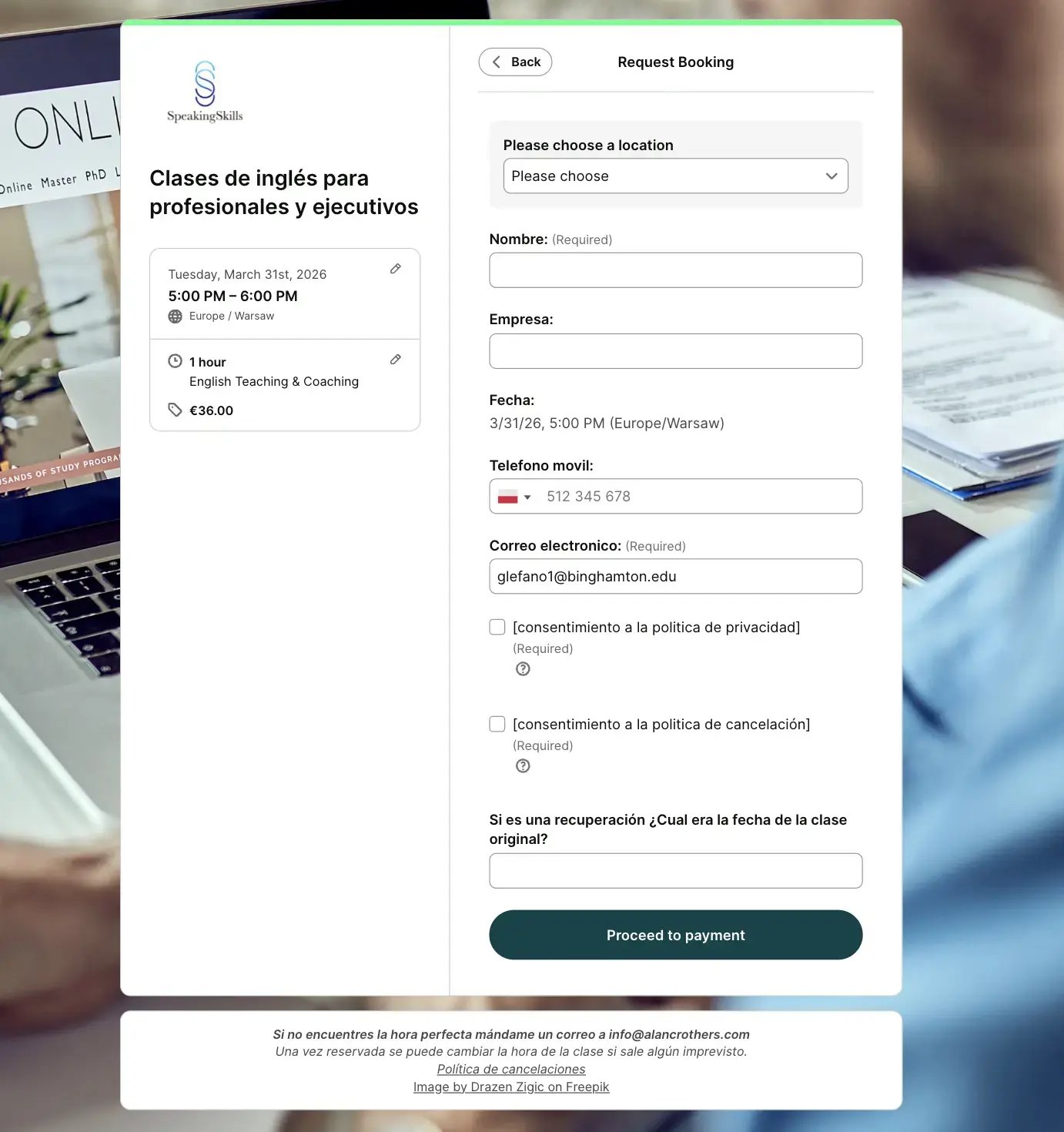
Next up, we have Alan Crothers, founder of SpeakingSkills, where he helps professionals and executives build confidence in English through coaching, conversation practice, and presentation training.
👉 About Alan’s booking page: Alan offers several types of sessions, including an introductory speaking assessment and one-hour English coaching lessons. Each appointment on his coaching booking page clearly lists the session length and price, making it easy for bookers to choose the right option. His booking form collects helpful details like the client’s name, company, and contact information before confirming the session.
👀 What caught our eye: Alan asks bookers to review and accept both his cancellation and privacy policies before moving forward with payment. By including these required checkboxes directly in the booking form, Alan sets clear expectations from the start, helping protect his time while keeping the booking experience smooth and transparent for clients.
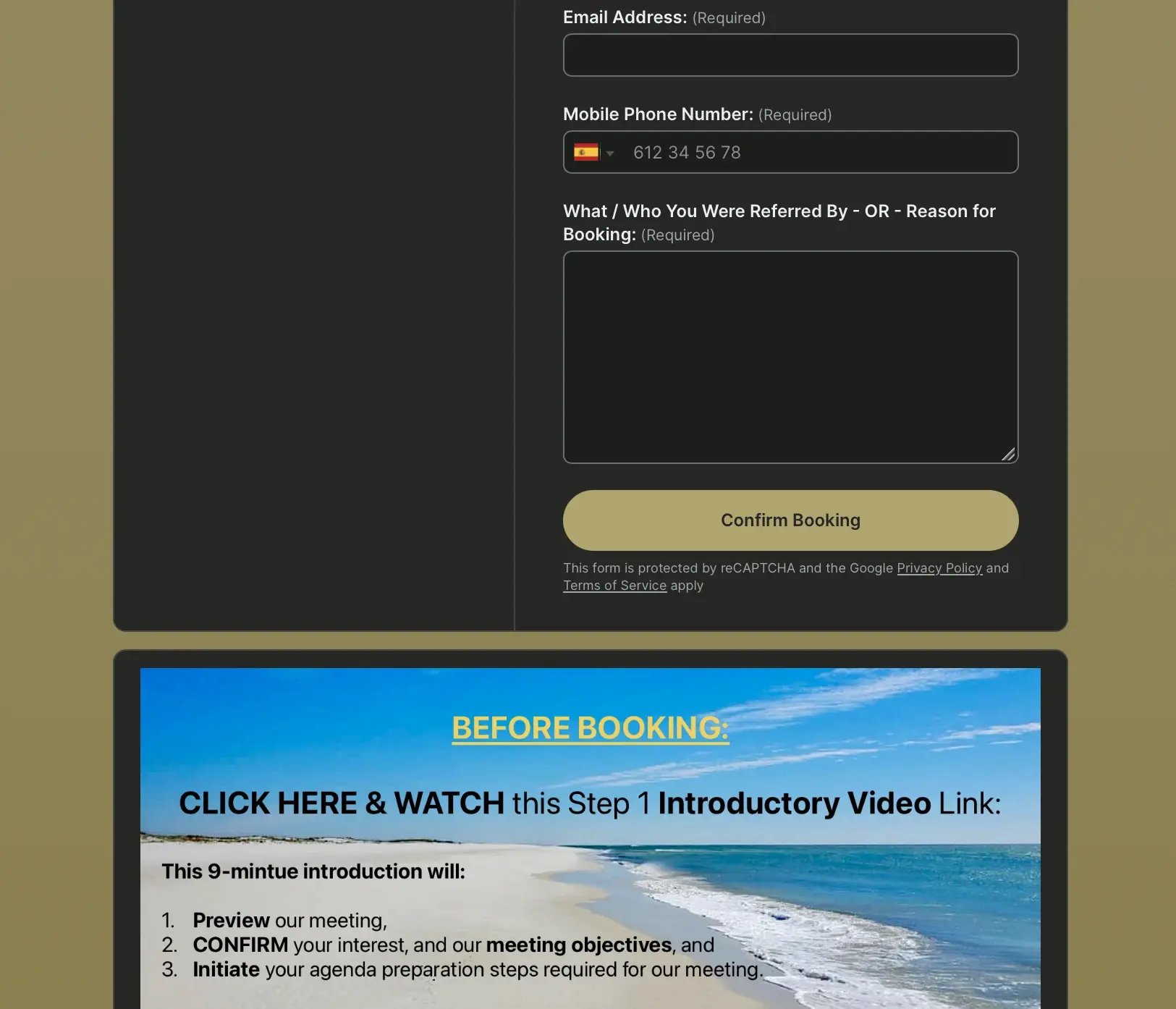
Let’s meet Julian Reid, a Career Ownership Coach who helps professionals gain clarity, direction, and ownership over their careers through guided coaching sessions.
👉 About Julian’s booking page: Julian offers coaching sessions that clients can schedule by choosing a time that fits their availability. His booking page also includes clear instructions for first-time bookers, helping them understand what the meeting will cover and how to prepare before selecting a time.
👀 What caught our eye: Julian asks new clients to watch a short introductory video before their first appointment. This nine-minute video previews the meeting, confirms the client’s interest, and outlines the objectives of the session. By sharing this information ahead of time, Julian can start each call with aligned expectations and focus on the conversation right away.
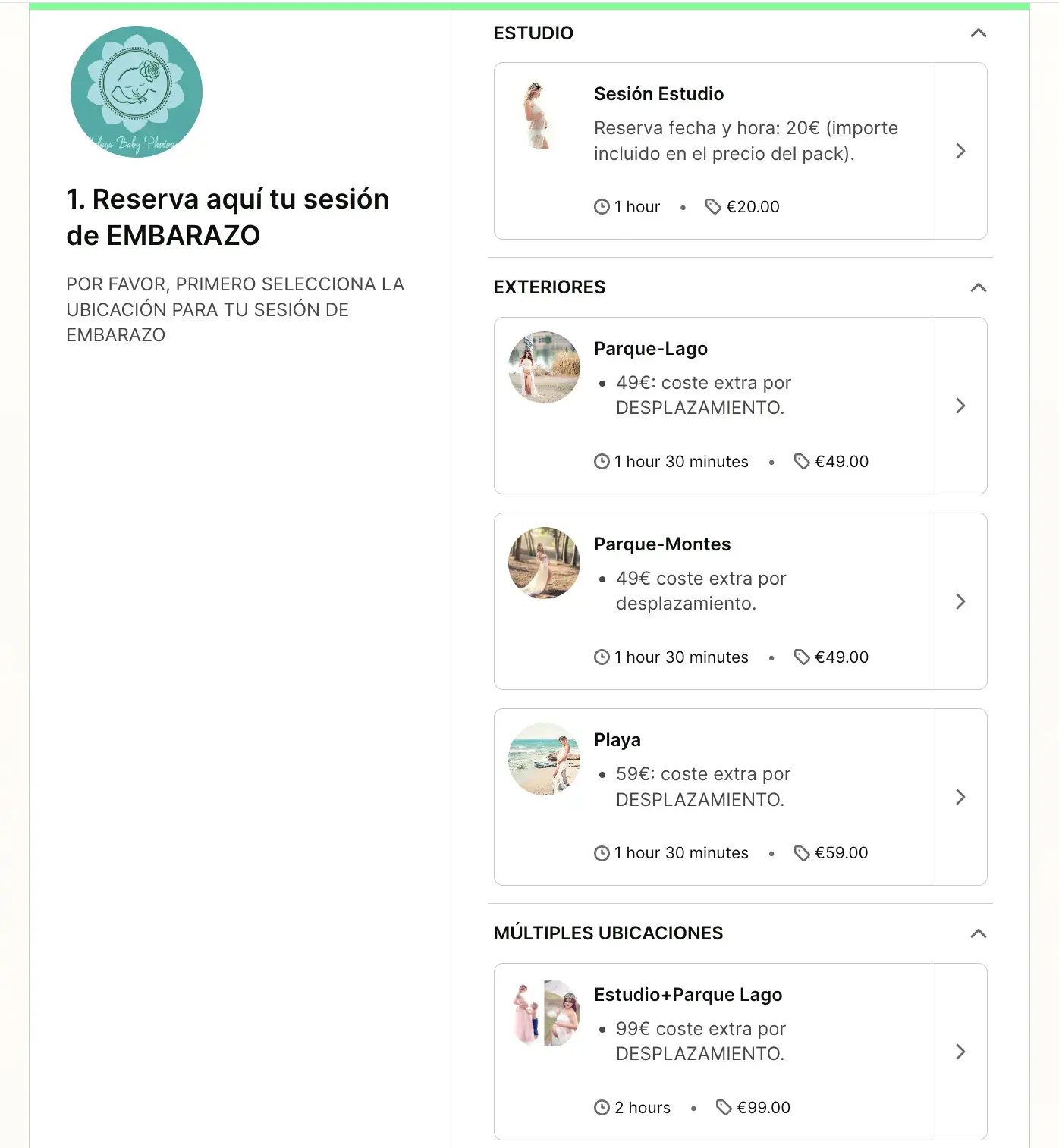
Meet Sandra and Valentín, the photographers behind Málaga Baby Photography, a studio in Málaga, Spain dedicated to maternity, newborn, and children’s photography. For more than 12 years, they have helped thousands of families capture meaningful moments and create memories that last a lifetime.
👉 About Sandra and Valentín’s booking page: Their booking page allows clients to reserve maternity sessions while choosing the location that best fits their vision. Clients can select between studio sessions or outdoor locations such as parks, forests, or the beach. Each option clearly shows the session length and any additional travel cost, making it easy for families to plan their photoshoot.
👀 What caught our eye: The soft colors and warm tones of the booking page reflect the same aesthetic used across Málaga Baby Photography’s website and brand. Combined with photos that preview each location, the page feels calm, inviting, and perfectly aligned with the emotional nature of maternity photography.
|
📷 Are you a photographer looking for more inspiration for your booking page? Check out our blog post featuring the top five photography booking page examples. |
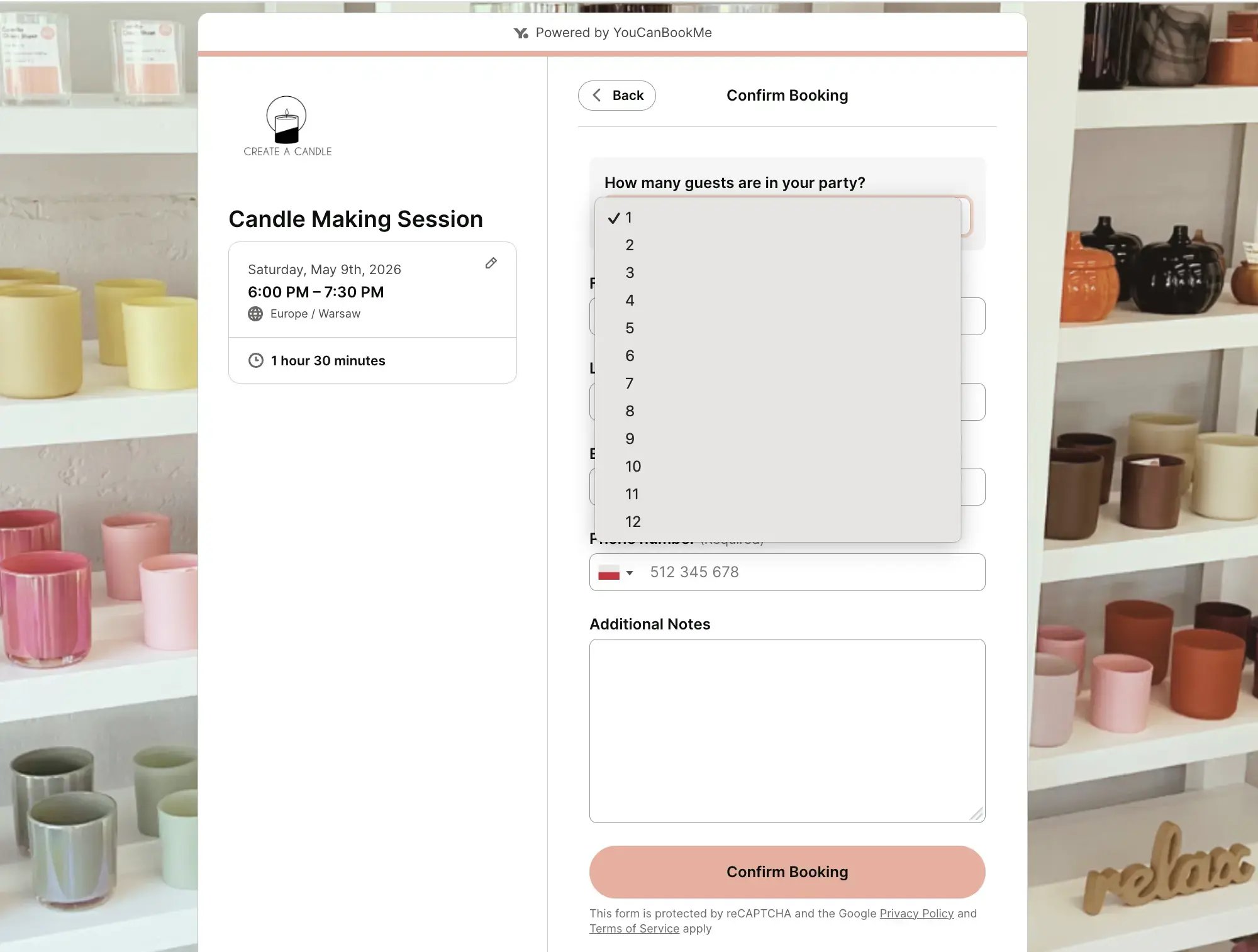
Say hello to Create A Candle, a candle-making studio in Hagerstown, Maryland where visitors can design their own custom candles, reed diffusers, and room sprays while enjoying a hands-on creative experience.
👉 About Create A Candle’s booking page: Guests can reserve spots for candle-making sessions that last about 90 minutes. The booking page clearly explains the pricing range depending on the candle style chosen and outlines how many participants each session can accommodate. During booking, guests simply select their preferred date and time before confirming their reservation.
👀 What caught our eye: The booking form asks how many guests are in the group. This small feature makes a big difference for experience-based businesses like workshops or classes. It allows Create A Candle to manage class capacity while making it easy for friends, families, or groups to book together in a single reservation.
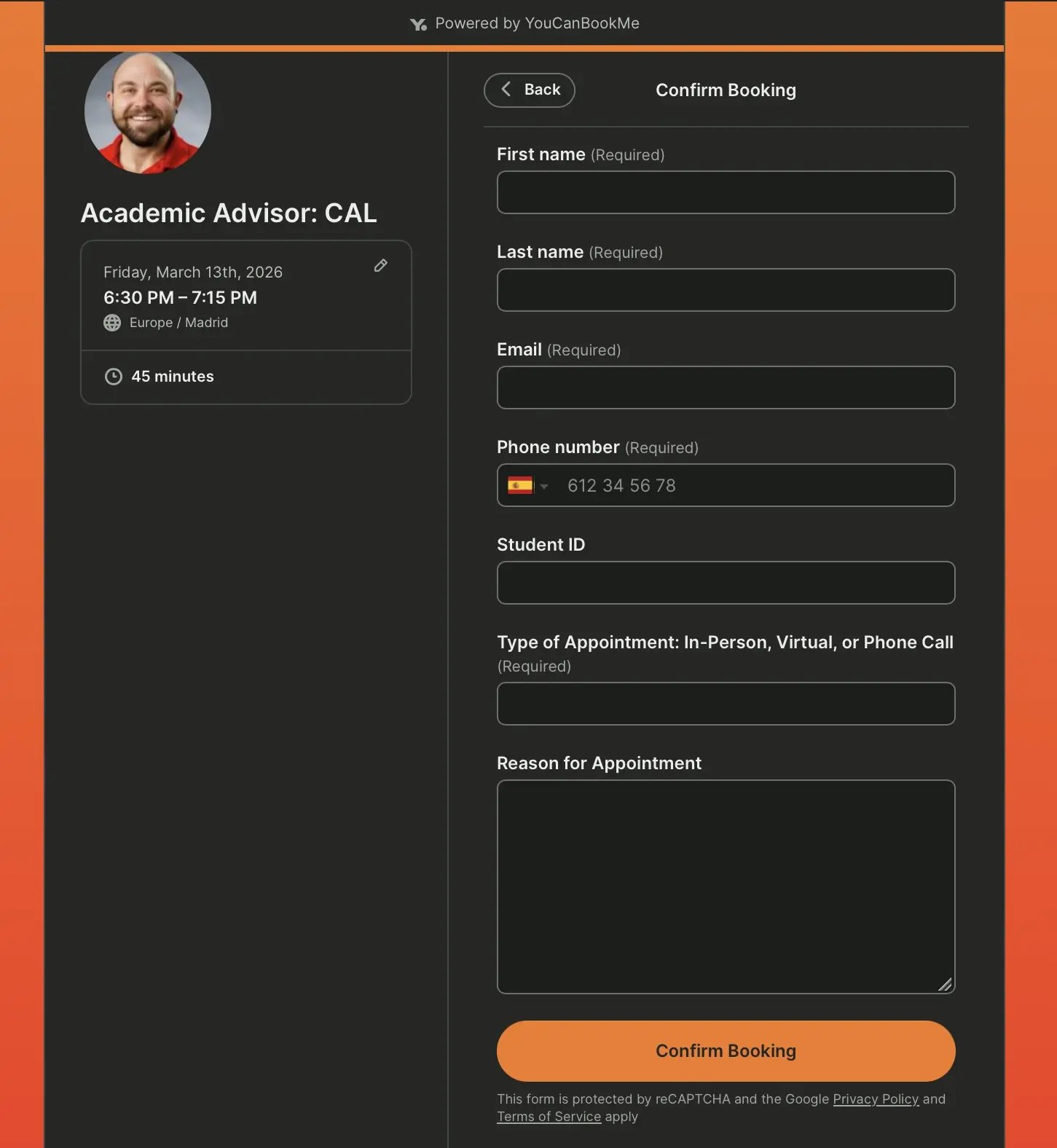
Meet Jodi Dunn, an academic advisor for the College of Arts and Letters at Idaho State University. He helps students and future students navigate course planning, degree requirements, academic concerns, and general support throughout their studies.
👉 About Jodi’s booking page: Jodi offers 45-minute sessions that students can schedule directly from his advising booking page. The page includes a short introduction explaining who the appointment is for and what types of topics students can discuss. Students simply choose a time that works for them and complete the booking form.
👀 What caught our eye: Jodi’s booking form collects helpful details before the meeting, including the student’s ID, preferred meeting type, and the reason for the appointment. Gathering this information ahead of time helps him prepare for each session and ensures students receive more focused and efficient advising.
Wrapping up
Your booking page will differ based on the business you're in, the services you offer (and how many), your terms of service, and so much more. But, we hope that these examples inspired you to create or build on your current booking page.
And of course, scroll back through the examples again to see how every single booking page represents the unique branding of the businesses we've highlighted today!
FAQ about booking pages
How can I create my own booking page?

To set up your booking page, sign up for a YouCanBookMe account and start your free 14 day trial. Once you've entered your email address, connect your preferred calendar and specify your meeting length and availability.
Then, give your booking page a title and choose how you’d like to meet, whether through a video conferencing platform like Zoom or in person. After that, customize your booking page link to match your business and add an introduction with any relevant information. Your booking page is now ready to use!
Once the trial period ends, you can choose to stay on YouCanBookMe’s free plan, or upgrade to a paid plan of your choice.
Does YouCanBookMe offer a free plan?
Yes, YouCanBookMe offers a free forever plan with many useful booking features, including:
- Unlimited bookings
- Personalized booking link
- Option to embed your booking page on your website
- Configurable booking form to collect information before each meeting
- Option to add branding to your booking page (such as logos and images)
- Automated and customizable email confirmations
- Access to booking records
- Ability to set prices and take payment for appointments
What are the best ways to brand and personalize my booking page?
Branding your booking page helps you build trust and create a seamless experience for your clients. With YouCanBookMe, you can:
- Add your logo so clients instantly recognize your business.
- Use your brand colors and fonts to match your website and marketing.
- Upload team photos or headshots to put a face to the name.
- Include your own messaging—from a welcome note to clear booking instructions.
- Set a custom background with an image of your office, studio, or product in action
- Tailor confirmation and reminder messages so every client interaction feels consistent and professional.
The goal is to make your booking page feel like a natural extension of your brand—familiar, trustworthy, and unique to you.
-min.png)
Written by
Gabriela Łaba
Gabriela is Editor-in-Chief at YouCanBookMe and a SaaS copy and content writer with over a decade of experience. Since 2021, she’s written 100+ articles on scheduling, personally tested and compared 38 booking tools, and helped businesses make sense of scheduling, automation, and productivity.
Get started today
Join thousands of coaches, consultants, and entrepreneurs who use YouCanBookMe to power their business. Get your first booking in a few minutes.


 4.7 / 5 — Trustpilot

